Category: Uncategorized

  • What Is SEO and How Does It Work? A Complete Beginner’s Guide

    What is SEO and how does it work? Search engine optimization (SEO) helps your website appear in search engine results when people look for products, services, or information related to your business. By using relevant keywords, publishing helpful content, improving website performance, and building quality links, businesses can attract organic traffic and reach potential customers online.


    Today, having a website is not enough to grow a business online. Your potential customers need to find you when they search on Google. This is where SEO becomes important. Whether you run a startup, a local business, an online store, or a software company, understanding SEO can help you build online visibility and generate long-term opportunities.
    What Is SEO?

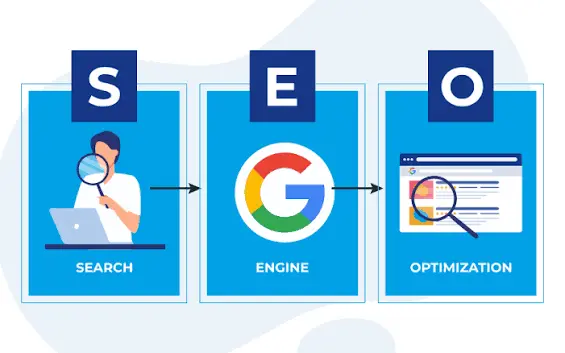
    SEO stands for Search Engine Optimization. It is the process of improving a website so that search engines can understand its content and users can find useful information through unpaid search results.

    For example, if someone searches for “custom software development company,” businesses with relevant, useful, and well-optimized pages may appear in the search results.

    SEO includes several activities, such as:

    • Keyword research to understand what people search for.

    • On-page SEO to optimize titles, headings, content, and images.

    • Technical SEO to improve crawling, indexing, and website performance.

    • Content creation to answer users’ questions.

    • Off-page SEO to earn relevant, trustworthy backlinks.

    • Local SEO to improve visibility for location-based searches.

    The main goal is to make your website useful to your audience and accessible to search engines.

    SEO helps search engines understand:

    • What your website and individual pages are about.

    • Which search queries your content may be relevant to.

    • Whether your pages provide useful information.

    • How your website connects to other relevant resources.

    SEO does not guarantee first-page rankings. Instead, it helps improve your website’s eligibility and ability to compete for relevant searches over time.

    How Does SEO Work?

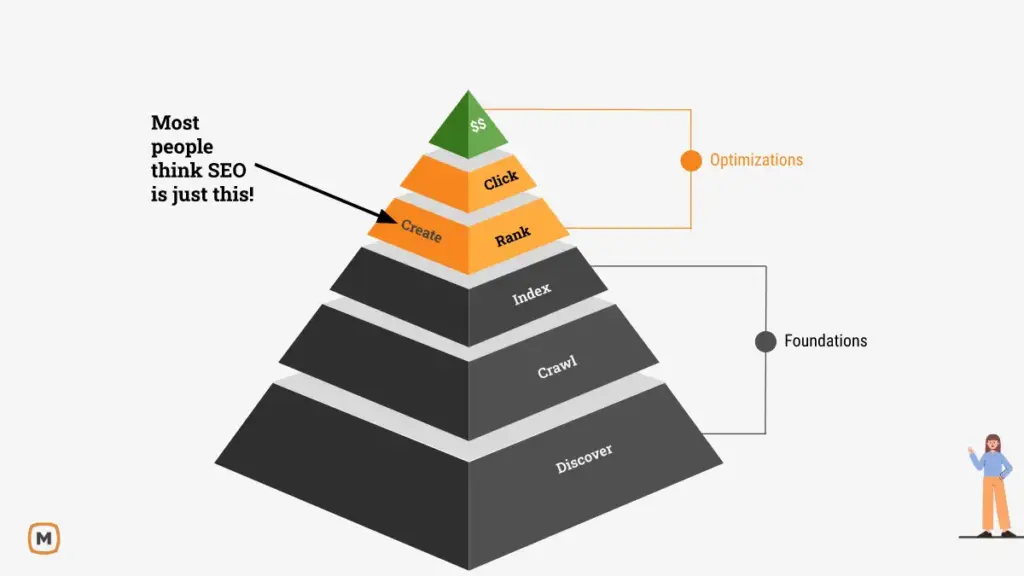
    Understanding how SEO works begins with understanding how search engines discover and display web pages. Search engines generally follow three main processes: crawling, indexing, and ranking.

    1. Crawling

    Crawling is the process through which search engines discover pages on the internet. Automated programs, often called crawlers or bots, follow links and explore accessible web pages.

    You can help search engines discover your content by creating a logical website structure, using internal links, and maintaining an XML sitemap.

    2. Indexing

    After discovering a page, a search engine may analyze its content, images, and other information to understand what the page is about. It can then store the information in its index.

    Not every page discovered is guaranteed to be indexed. Duplicate content, access restrictions, technical errors, or low-value pages can affect whether a page is included.

    3. Ranking

    When someone searches for something, the search engine selects and orders results that are most relevant and useful for that query.

    Factors that can influence visibility include content relevance, page usability, website accessibility, and the quality of information. There is no guaranteed shortcut to the top position, and SEO results depend on competition and many other factors.
    Why Is SEO Important for Businesses?

    SEO can help businesses attract relevant visitors, establish trust, and create opportunities for long-term growth.

    1. Increases Organic Website Traffic

    When your pages appear for relevant search queries, potential customers can discover your business without you paying for every organic click.

    2. Builds Brand Credibility

    Users can discover your expertise through helpful blog posts, service pages, case studies, and educational resources. Consistently useful content can strengthen your brand’s credibility.

    3. Supports Lead Generation

    SEO can attract visitors who are actively researching products or services. Clear service descriptions, contact forms, and calls to action can help turn relevant visitors into enquiries.

    4. Supports Long-Term Growth

    Unlike paid advertising, organic search traffic does not depend on paying for every click. However, SEO still requires investment in content, technical improvements, monitoring, and ongoing updates.

    5. Helps You Understand Your Audience

    Keyword research and search performance data reveal the questions customers ask, the problems they want to solve, and the topics they care about.

    What Are the Main Types of SEO?

    An effective SEO strategy combines several activities rather than focusing on keywords alone.

    1. On-Page SEO

    On-page SEO involves optimizing elements within individual webpages to help users and search engines understand the content.

    Important on-page SEO practices include:

    • Using relevant keywords naturally.

    • Writing clear title tags and meta descriptions.

    • Organizing content with descriptive H1, H2, and H3 headings.

    • Creating useful, original content.

    • Adding descriptive image alt text.

    • Using relevant internal links.

    • Making pages easy to read on mobile devices.

    For example, a page about custom software development should explain the service, its benefits, suitable use cases, and the problems it solves. Repeating the same keyword excessively will not make the content more useful.

    2. Off-Page SEO

    Off-page SEO refers to activities outside your website that can help build its reputation and visibility.

    Examples include earning relevant backlinks, publishing expert contributions, building genuine industry relationships, and promoting useful resources.


    Quality matters more than collecting large numbers of links. Avoid manipulative link-building schemes that attempt to artificially influence rankings.

    3. Technical SEO

    Technical SEO helps search engines access, crawl, understand, and index your website.

    Key areas include:

    • Website speed and performance.

    • Mobile usability.

    • HTTPS security.

    • XML sitemaps.

    • Robots.txt and indexing directives.

    • Canonical URLs and duplicate content management.

    • Broken links and redirect errors.

    • Structured data where appropriate.

    A technically sound website makes it easier for search engines to process your content and for visitors to navigate your pages.

    4. Content SEO

    Content SEO focuses on creating helpful pages that satisfy search intent.

    Businesses can publish educational blog posts, detailed service pages, comparison articles, FAQs, and practical guides to address customer questions at different stages of the buying journey.


    For example, a business planning a new digital product may first search for development costs, then compare solutions, and finally look for a development partner.


    A well-planned content strategy can support these different needs.

    5. Local SEO

    Local SEO helps businesses improve their visibility in geographically relevant searches, such as “web development company in Noida.”


    Businesses serving specific areas should maintain accurate business information, optimize their Google Business Profile, collect genuine customer reviews, and create useful location-specific content where appropriate.

    How to Do SEO Step by Step

    If you are new to SEO, follow these practical steps to build a foundation for your website.


    Step 1: Conduct Keyword Research

    Identify the terms your target audience uses when searching for your products, services, and solutions.

    Focus on search intent, relevance, and realistic opportunities rather than choosing keywords solely because they have high search volume.


    Step 2: Analyze Search Intent and Competitors

    Review the types of pages appearing for your target queries. Determine whether searchers expect a guide, a comparison, a product page, or a service page.

    Use this information to create content that answers the question more completely and clearly.


    Step 3: Optimize Important Pages

    Improve your homepage, service pages, and important landing pages. Make each page’s purpose clear and use descriptive headings, relevant keywords, and helpful calls to action.


    Step 4: Publish Useful Content

    Create original blog posts that solve real customer problems. Link related articles to relevant service pages so readers can move naturally from learning about a topic to exploring a solution.


    Step 5: Improve Technical Performance

    Check mobile usability, page speed, indexing, internal links, and sitemap configuration. Use Google Search Console to identify indexing problems and monitor search performance.


    Step 6: Measure and Improve

    Track organic clicks, impressions, click-through rates, relevant keyword performance, leads, and conversions. Review the data regularly and improve pages based on what you learn.


    SEO is an ongoing process, and results can take weeks or months to become noticeable.

    How SEO Connects With Web Development and Digital Services

    SEO is not just a content activity. Your website’s technical foundation, user experience, and digital strategy can all influence how effectively it attracts and serves visitors.


    For example, custom software development can help businesses build digital systems that support their operational needs. You can explore Builder Monkey’s custom software development services to learn about tailored business solutions.


    Businesses building subscription-based digital products can also explore SaaS development services. A clear public-facing website and useful product information can support the discoverability of a SaaS business.


    For startups, MVP development services can help turn an idea into a product with essential features. Planning SEO and content requirements early can help ensure the product’s public pages address relevant customer needs.


    If you are unsure which technology or approach fits your business, software consultation services can help you evaluate your requirements and plan an appropriate solution.


    The important point is that SEO should support your wider business objectives. More traffic is valuable only when it reaches the right audience and helps achieve meaningful outcomes.


    Common SEO Mistakes to Avoid

    Even a well-designed website can struggle to attract organic traffic if its SEO strategy has common weaknesses.

    Avoid these mistakes:

    • Keyword stuffing: Repeating keywords unnaturally makes content difficult to read.

    • Thin content: Pages should provide useful information rather than simply target a phrase.

    • Ignoring mobile users: Your website should work well on smaller screens.

    • Missing internal links: Related pages should connect through useful, descriptive links.

    • Duplicate content: Similar pages without a clear purpose can create confusion.

    • Ignoring technical problems: Indexing errors and broken links can affect accessibility.

    • Expecting instant results: SEO takes time and requires ongoing monitoring.

    • Focusing only on rankings: Traffic quality, enquiries, and conversions matter too.

    How Long Does SEO Take to Show Results?

    SEO timelines vary depending on competition, website history, technical health, content quality, and the resources invested.


    Some changes may be reflected relatively quickly, while meaningful improvements in organic visibility can take several months or longer. New websites often need time to build useful content, earn recognition, and establish search visibility.


    Monitor performance consistently and avoid judging an SEO strategy using only short-term ranking fluctuations.

    Conclusion

    Understanding what SEO is and how it works is an important step toward building a stronger online presence. By researching keywords, creating helpful content, improving technical performance, optimizing service pages, and earning relevant backlinks, businesses can make their websites easier to discover.


    SEO requires patience, consistent effort, and regular measurement. Focus on helping your audience first, then use search data to improve your strategy over time.


    If you want to build or improve your digital presence, visit Builder Monkey or contact our team to discuss your business requirements.

    Frequently Asked Questions About SEO

    1. What is SEO in simple words?

    SEO is the process of improving a website so that it can appear more prominently in relevant unpaid search results and attract visitors interested in its content or services.

    2. How does SEO work for beginners?

    Start by researching keywords, creating helpful content, optimizing titles and headings, improving website performance, adding relevant internal links, and monitoring your results in Google Search Console.

    3. Is SEO free?

    Organic search listings do not charge a fee for each click, but SEO requires time and effort. Businesses may invest in content creation, technical improvements, tools, or professional services.

    4. What are the main types of SEO?

    The main categories commonly discussed are on-page SEO, off-page SEO, technical SEO, and content SEO. Local SEO is also important for businesses targeting customers in specific areas.

    5. How long does SEO take to work?

    It varies by website and competition. Meaningful results often take several months, and continued improvement is usually necessary to maintain visibility.

    6. Is SEO better than Google Ads?

    SEO and Google Ads serve different purposes. SEO can build long-term organic visibility, while Google Ads can provide paid placement when campaigns are active. The right choice depends on your budget, goals, timeline, and audience.

    7. Can SEO help a small business?

    Yes. Small businesses can target relevant service keywords, specific customer needs, and local searches to improve visibility and attract potential customers.
  • Website vs Web Application: Which Is Better for Your Business?

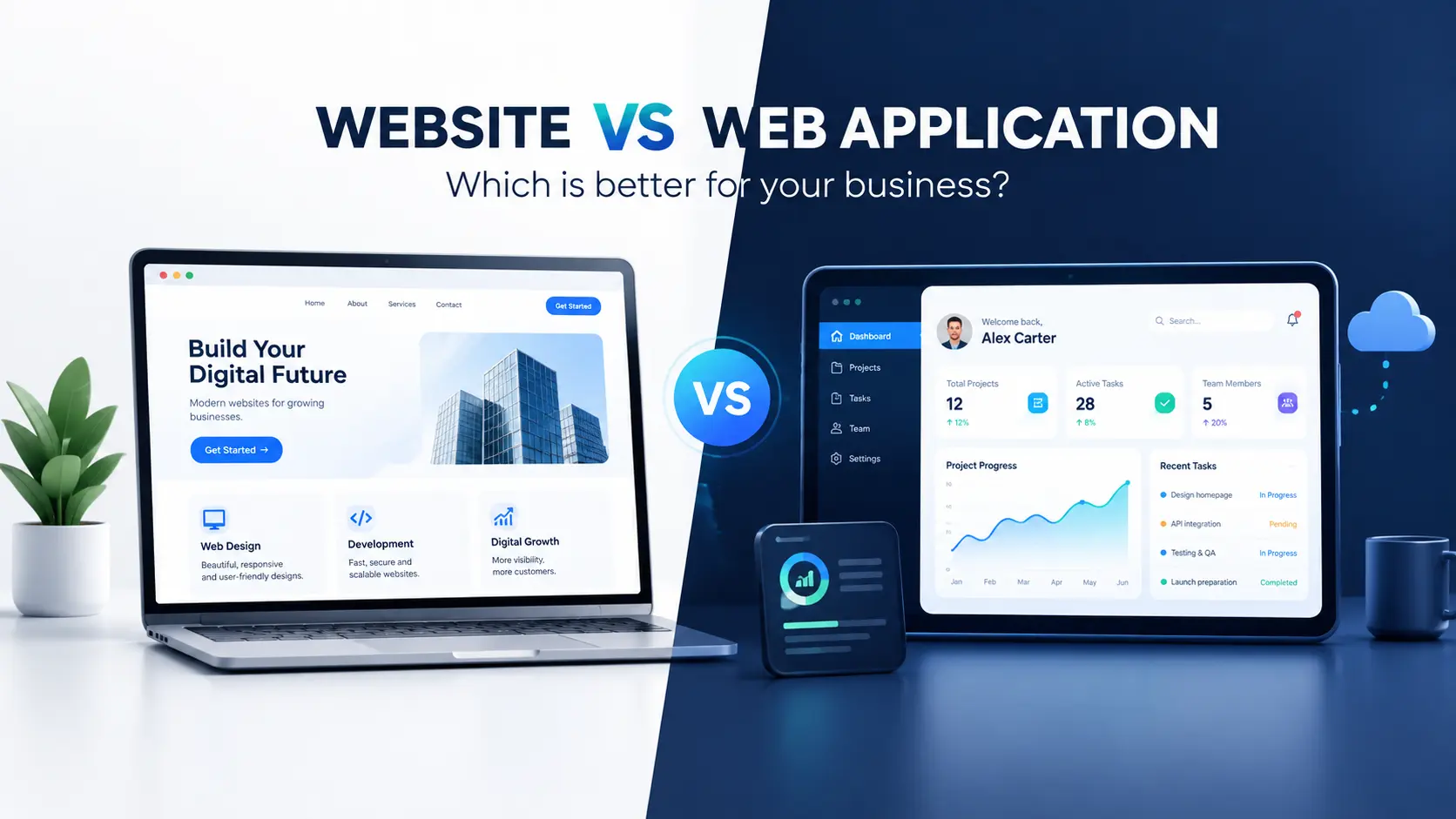
    Every business needs a strong digital presence, but choosing the right digital solution can be confusing. Should you build a traditional website to showcase your services, or invest in a web application that allows users to interact with your business online?

    Understanding the difference between a website vs web application can help you make a smarter investment, improve customer experience, and support long-term business growth.


    Both solutions operate through web browsers, but they serve different purposes. A website primarily informs visitors about your business, while a web application enables users to perform specific tasks, manage information, and interact with digital services.


    In this guide, we will explore the key differences, benefits, costs, and use cases of websites and web applications to help you choose the right solution for your business.

    A website is a collection of interconnected web pages accessible through the internet. It helps businesses establish an online presence, communicate with customers, showcase products or services, and generate enquiries.


    Most business websites include a homepage, about page, services page, blog, and contact page. Depending on your requirements, you can also include landing pages, portfolios, testimonials, and lead generation forms.

    Benefits of a Website

    1. Builds online credibility

    A professional website helps potential customers understand your business, explore your services, and evaluate your credibility before contacting you.


    2. Improves search engine visibility

    Search engine optimisation (SEO) helps your website appear in relevant search results. Well-structured pages, useful content, relevant keywords, and good performance can help attract organic traffic.


    3. Generates leads and enquiries

    Contact forms, calls to action, appointment requests, and WhatsApp buttons make it easier for visitors to connect with your business.


    4. Offers a cost-effective starting point

    For businesses that primarily need an online presence, a website can be simpler to develop and maintain than a feature-rich web application.

    Who Should Choose a Website?

    A website is generally suitable for:

    • Small and medium-sized businesses.

    • Digital marketing agencies and professional service providers.

    • Consultants, freelancers, and personal brands.

    • Companies that want to generate leads through Google.

    • Startups validating a business idea before investing in a digital product.

    If your primary goal is to promote your business and attract potential customers, explore Builder Monkey’s website to learn more about its digital solutions.

    A web application, commonly called a web app, is interactive software that users access through a web browser. Unlike a basic informational website, it allows users to complete tasks, manage data, and receive personalised results.


    Web applications typically combine a user interface with application logic, databases, and integrations. Depending on the product, they may also include authentication, role-based permissions, notifications, and payment processing.

    Examples of Web Applications

    • Customer relationship management (CRM): Manage leads, customers, and sales activities.

    • Project management platforms: Assign tasks, track deadlines, and collaborate with teams.

    • Online booking systems: Schedule appointments and manage reservations.

    • SaaS platforms: Provide subscription-based software through a browser.

    • Customer portals: Allow customers to access accounts, invoices, documents, and service updates.

    Benefits of Web Application Development

    1. Automates business processes

    A custom web application can reduce repetitive manual work by automating workflows, approvals, reporting, and data management.


    2. Provides personalised experiences

    Users can log in and access information relevant to their accounts, activities, permissions, or preferences.


    3. Improves operational efficiency

    A centralised application can help teams manage information in one place instead of switching between spreadsheets and disconnected tools.


    4. Supports business scalability

    A well-planned application can evolve as your business grows, with additional features, integrations, and user capacity introduced when required.


    If you need software tailored to your workflows, explore Builder Monkey’s custom software development services.

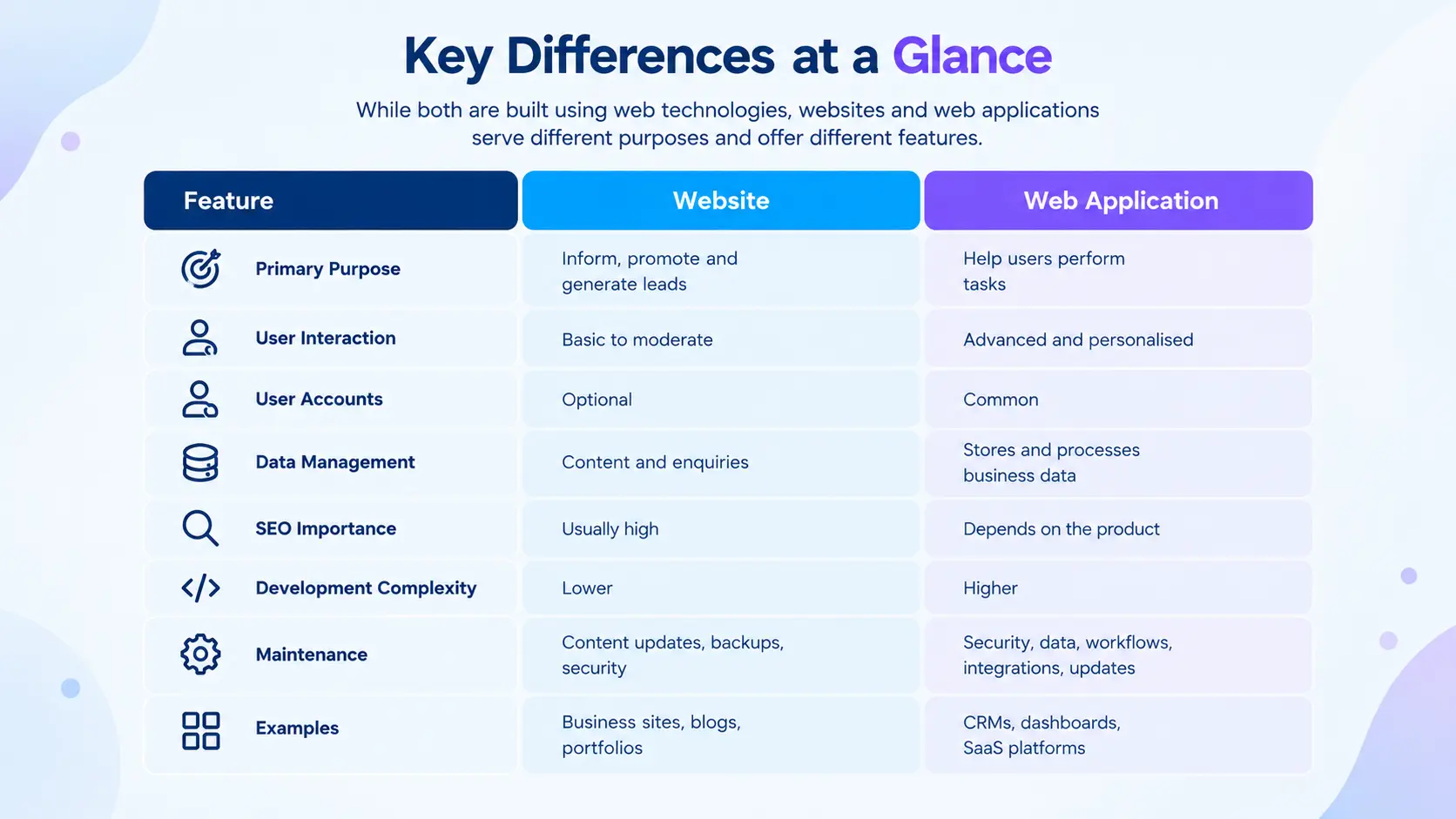
    Website vs Web Application: Key Differences

    Although both use web technologies, their functionality, complexity, and business objectives can differ significantly.


    The main difference: A website helps people discover and understand your business, whereas a web application helps them accomplish something through your digital product.


    However, the distinction is not always absolute. Modern websites can contain interactive features, and web applications can include public-facing pages designed for search engines.

    Website vs Web Application: Which Is Better for Your Business?

    The right choice depends on your business objectives, users, and required functionality.

    A website is usually the better starting point if you want to:

    • Establish an online presence.

    • Showcase products or services.

    • Rank for relevant keywords on Google.

    • Publish blogs and educational content.

    • Generate enquiries and sales leads.

    • Build trust with potential customers.

    For example, a digital marketing agency may need service pages, case studies, a blog, and a contact form. These features can support customer acquisition without requiring a complex custom application.

    Choose a Web Application If Your Goal Is Digital Functionality

    A web application is more appropriate when users need to interact with a system regularly.

    Consider one if you want to:

    • Build a subscription-based software product.

    • Create customer or employee dashboards.

    • Automate internal business operations.

    • Manage bookings, orders, or transactions.

    • Provide personalised user accounts.

    • Connect several business systems through integrations.

    For example, a logistics company that wants customers to book shipments, track deliveries, and download invoices may benefit from a web application rather than a basic informational website.


    If you are planning a subscription-based product, explore Builder Monkey’s SaaS development services.

    Can a Business Have Both a Website and a Web Application?

    Yes. In fact, combining both is often an effective strategy for growing businesses.

    A public-facing website can attract visitors through SEO, explain your services, and convert potential customers. A connected web application can then provide functionality for registered users.

    For example, an online education company might use:

    • Marketing website: Course descriptions, blog articles, instructor profiles, and pricing information.

    • Web application: Student login, course progress, quizzes, certificates, and personalised dashboards.

    Similarly, an e-commerce business can use public product pages to attract search traffic while relying on application functionality for shopping carts, checkout, customer accounts, and order tracking.

    This approach allows businesses to balance discoverability with functionality.

    Website Development vs Web Application Development: What About Cost?

    The cost of website development and web application development depends on project scope, design complexity, technology, integrations, security requirements, and ongoing maintenance.


    A relatively simple business website generally requires fewer development resources than a custom application with user accounts, databases, automated workflows, and third-party integrations.


    Web application projects may also require more extensive testing, access controls, data protection, and long-term technical support.


    Instead of comparing prices based only on the labels “website” and “web app,” evaluate the features you actually need.


    Before development begins, define your minimum requirements, prioritise essential features, and identify opportunities to use existing tools rather than building everything from scratch.


    Startups can also consider a Minimum Viable Product (MVP), which focuses on the core functionality needed to test a product idea before expanding it. Learn more about MVP development services.

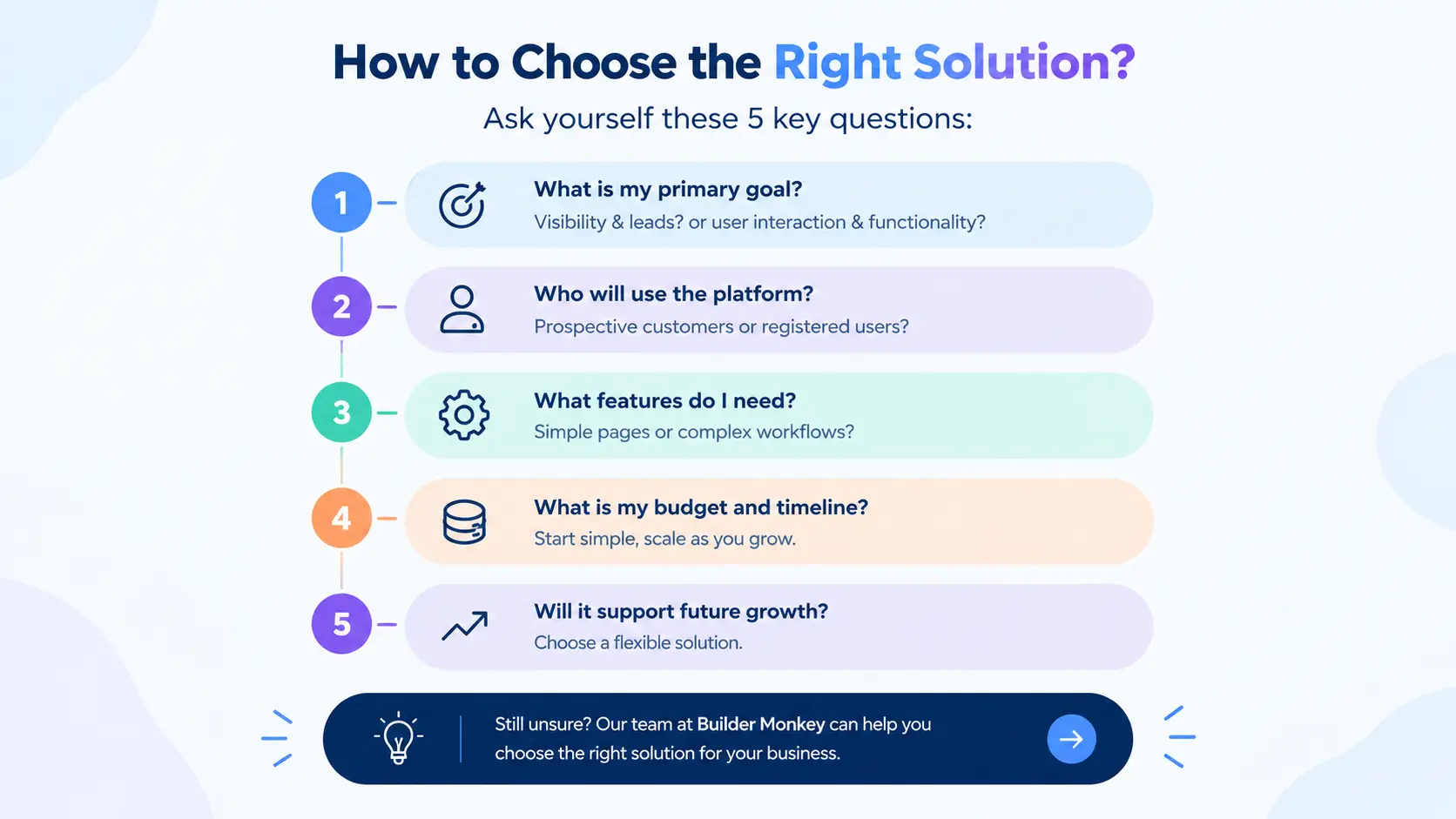
    How to Choose the Right Solution: 5 Questions to Ask

    Before investing in website development or web application development, answer these five questions:


    1. What is my primary business goal?

    If you want visibility and enquiries, start with a website. If you need users to complete tasks through software, consider a web application.


    2. Who will use the platform?

    If most visitors are prospective customers looking for information, a website may be sufficient. If customers or employees need accounts and personalised access, application features may be necessary.


    3. What functionality do I actually need?

    List your essential features, such as contact forms, payments, dashboards, booking systems, reporting, and integrations. This will help determine the appropriate scope.


    4. What is my current budget and timeline?

    Start with the simplest solution that meets your immediate requirements. Avoid investing in complex functionality before you have a clear business need.


    5. Will the solution support future growth?

    Choose an approach that can evolve with your business. You may start with a website and add a customer portal or application features when demand justifies the investment.


    For help evaluating technology choices and project requirements, visit Builder Monkey’s software consultation page.

    Final Verdict: Website or Web Application?

    There is no universal winner in the website vs web application comparison. The best solution is the one that supports your business goals without introducing unnecessary complexity.

    Choose a website when you need online visibility, brand credibility, content marketing, and lead generation. Choose a web application when your users need interactive features, personalised accounts, data management, or automated workflows.

    If your business needs both customer acquisition and advanced functionality, a combined approach may be the most practical option.

    The key is to start with clearly defined requirements, prioritise what matters most, and build a solution that can grow with your business.

    Ready to build your digital solution?

    Builder Monkey can help you explore software and web application development options based on your business requirements. Visit Builder Monkey or contact the team to discuss your project.

    Frequently Asked Questions (FAQs)

    1. What is the main difference between a website and a web application?

    A website primarily provides information about a business, product, or service. A web application allows users to perform interactive tasks, manage data, and access personalised functionality through a browser.


    2. Is a web application better than a website?

    Not necessarily. A website is generally better for online visibility and lead generation, while a web application is better for complex interactions and digital workflows. The right choice depends on your business needs.


    3. Is a website cheaper than a web application?

    A basic website is often less expensive to develop because it typically requires less custom functionality. A web application may require additional investment in databases, authentication, integrations, security, and testing.


    4. Can a website be converted into a web application?

    Yes. A website can be expanded with features such as user accounts, dashboards, booking systems, and data management. The feasibility and effort depend on the existing technology and the features required.


    5. Which is better for a startup: a website or a web application?

    A startup focused on validating demand and generating leads may benefit from starting with a website. A startup whose core product is interactive software may need a web application or MVP. Choose the approach that best supports the business model.


    6. Does a web application help with SEO?

    Yes, public-facing pages associated with a web application can be optimised for search engines. However, content behind login screens is generally not available for indexing, so public marketing pages often play an important role in organic search visibility.

  • Hello world!

    Welcome to WordPress. This is your first post. Edit or delete it, then start writing!

Solverwp- WordPress Theme and Plugin